Know every player’s form
AVG, K/D, ADR, recent results and player roles on lobby cards. Get to know your team and the opposition before the match.
 upceitEXTENSIONWidgets
See who’s in form, which maps suit your team and who you’ve played with before. UPCEIT brings player stats, past encounters and match tools straight into FACEIT.
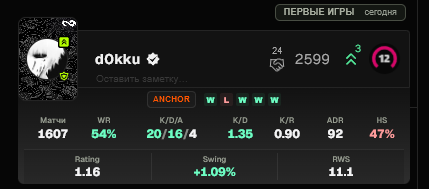
AVG, K/D, ADR, recent results and player roles on lobby cards. Get to know your team and the opposition before the match.
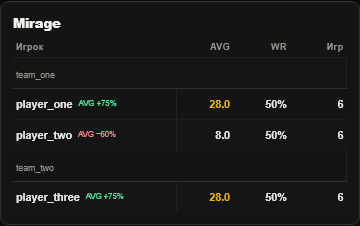
Compare both teams and hover over a map to see each player’s experience and results before the veto.
Open a profile to see K/D, kills per round, MVPs and clutches. The key numbers, together in one place.
Recognize players from past matches, check results together or against each other, and keep private notes.
Auto accept matches, set map and server priorities, and send your position to chat. Set up your routine once.
See FACEIT level, ELO and CS2 stats alongside a player’s Steam profile. Open them in your browser or the in-game overlay.
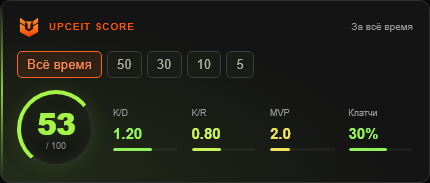
When your teammates are struggling and the opposition is on a roll, it helps to know early. UPCEIT compares both teams and explains the warning.
Get to know the lineup in seconds. Stats, roles, streaks, the current session and previous encounters sit next to every player.
Two charts compare map win rates and average kills for both teams. Read the matchup, then explore individual players before the veto.
Who picks up the AWP, takes the first duel, supports the team or wins clutches? UPCEIT identifies roles from player performance.
A single 0–100 score brings together K/D, kills per round, MVPs and clutch success. Explore its components and compare different periods.
Who have you won with, and who was on the other side? Encounter history brings familiar players back into focus. Private notes keep the details that matter to you.
Accept the match, choose the server, call your position and copy connect. Set up your routine and keep your attention on the game.
Extended levels, your colors, your personal Tracker and cloud sync. Make the interface your own, from player cards to menu icons.
AVG, K/D, K/R, ADR, win rate and match count on both teams’ player cards.
Last 5, 10, 20, 30, 50 or 100 matches. One setting for cards, maps and SCORE.
See player impact and round influence alongside the familiar stats.
Form, results, streaks and session ELO changes in a player’s session popover.
A warning about a large gap in team form, with a risk score and the reasons behind it.
Team ELO comparison adjusted for available form and party information.
Team level and average ELO next to the team name.
Compare both teams’ map win rates in one SVG chart.
Switch the chart to average kills to see where your team performs best.
Hover over a veto map to see individual performance and match samples.
Check your teammates’ map performance before entering the queue.
SNIPER, ENTRY, SUPPORT, ANCHOR, CLUTCHER, CARRY and RIFLER based on player performance.
A 0–100 profile score built from K/D, K/R, MVPs and clutches. Switch periods and explore the details.
See who you have teamed up with or played against and check your shared results.
Keep useful details next to player nicknames. Manage all your notes in settings.
An extended ELO scale with dedicated icons throughout FACEIT.
See your progress and the ELO needed for the next level.
Linked FACEIT profile, level, ELO and CS2 statistics on Steam profiles.
See available map and server information in the match acceptance window.
Compare latency to available servers before the game starts.
Enabled by default with a 3-second delay. Change the delay or cancel with one click.
Enable automatic acceptance of party invitations when gathering your team.
Set your preference order: favorites first, least preferred maps last.
Choose your region and server order for automatic veto actions.
Copy the connection command automatically or enable connecting to the server.
Save a message for each map. UPCEIT posts it in team chat when the map is selected.
Separate message sets for different roles and lineups. Switch profiles right in chat.
Customize FACEIT’s accent, UPCEIT’s accent, win/loss colors and level icons.
Keep UPCEIT stats in player cards while hiding native FACEIT content.
Sign in with FACEIT to sync settings and private notes across browsers.
Back up settings to a file and restore them in another browser.
The UPCEIT EXT badge marks players with a verified profile.
The Tracker entry in FACEIT’s menu opens the current account’s UPCEIT profile.
UPCEIT detects known FACEIT extensions and helps you open their settings before playing.
Let the extension help load public statistics for other UPCEIT users.
Automatic language detection and a language switch in settings. Features have individual controls.
Choose a wallpaper in the workshop or upload your own image or video in the extension. Adjust panel opacity, darkening and blur.
Share your upload by link before review. It appears in the public gallery after approval.

Open a player’s profile in Steam Overlay and check their FACEIT level, ELO and performance while you play.
Grab the UPCEIT link from the Chrome Web Store. Steam uses the same version.
Press Shift + Tab in game, open Steam’s browser and paste the link into the address bar.
Install the extension from its store page. Open a Steam profile to see the player’s FACEIT stats.
Choose your browser, add UPCEIT from its extension store and open FACEIT. Player stats appear right in lobbies and profiles.
Yes. Open the UPCEIT Chrome Web Store page in Opera GX and add the extension to your browser.
AVG, K/D, K/R, ADR, match results, map performance and UPCEIT SCORE. Compare individual players and both teams in the lobby.
The linked FACEIT profile, level, ELO and CS2 stats on Steam profiles. Open a profile in your browser or Steam Overlay.
To sync your settings and private notes across browsers. Core statistics are available without signing in.
Yes. Choose your stats, enable the automatic actions you want, and change interface and level icon colors in UPCEIT settings.