FACEIT ELO in Twitch chat
The !elo and !checkelo commands let viewers request streamer stats or look up another player. Connect generated responses to your existing chat bot.
 upceitTOOLKITWidgets
Connect FACEIT to Twitch: !elo and !checkelo chat commands, automatic Channel Points Predictions and Smart Ads between CS2 matches. Explore setup guides and tools.
The !elo and !checkelo commands let viewers request streamer stats or look up another player. Connect generated responses to your existing chat bot.
A Channel Points prediction opens from FACEIT match events and resolves from the published result. Configure predictions after connecting your Twitch channel.
Automate ad breaks using FACEIT events and channel settings. The aim is to run ads during preparation; execution depends on ad availability and Twitch limits.
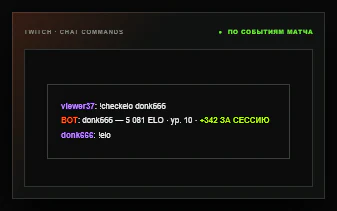
viewer: !elobot: FACEIT ELO · session results
This illustrates the response format rather than a player’s live stats. The command URL and text are generated in the selected profile settings.
Predictions and ads require the appropriate Twitch channel features and permissions. They are not available on every channel; access and limits are checked during setup.
No. Chat commands run through the configured Twitch bot. OBS is only needed for visual overlays.
After FACEIT publishes the tracked match result. Delayed match data can also delay prediction resolution.
Yes. Commands, Predictions and Smart Ads are configured separately.
A visual FACEIT overlay shows ELO, level and session results over the video. Add it to OBS Studio or Streamlabs Desktop as a Browser Source. Viewers see your stats on stream without typing a chat command.
The !elo command posts a response in Twitch chat, while !checkelo is used for player stats lookup. Use a chat bot and OBS overlay together: the overlay displays selected stats and the command answers a viewer’s request. Predictions and Smart Ads are configured separately.